SEO Search

  • Subscribe to our RSS feed.
  • Twitter
  • StumbleUpon
  • Reddit
  • Facebook
  • Digg

Wednesday, 27 November 2013

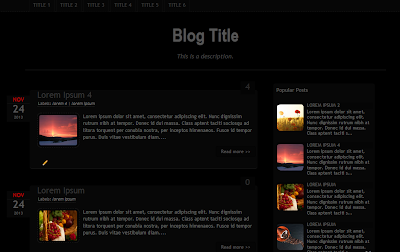
Dark Template

Posted on 07:22 by Unknown
dark template helplogger
DEMO | DOWNLOAD

Before anything you need to backup the current template. This is very important so you can always go back in case you come across any error.

Backup Current Template


Go to your Blogger Dashboard, select your blog > click on the Template option on the left side, then press the "Backup/Restore" button.

backup restore blogger template

For downloading your current template, click on the Download full template button:

download full template blogger

Upload the Dark Template 


To apply the Dark Template > click on Browse, search for the xml file that you have downloaded, select it and then press on the Upload button:
upload blogger template

Settings


1. Edit the Main Navigation Menu

Go to Blogger, select Template > click on Edit HTML button and search for the html code below (press CTRL + F keys). After you found it, replace 'Link URL' (without the quotes) to the ULR/address of the link that you want to target, also change the title of the link.
<li><a href='Link URL'>Title 1</a></li>
Change these lines as well:
<li><a href='Link URL'>Title 2</a></li>
<li><a href='Link URL'>Title 3</a></li>
<li><a href='Link URL'>Title 4</a></li>
<li><a href='Link URL'>Title 5</a></li>
<li><a href='Link URL'>Title 6</a></li>
If you want to add another link, then simply paste this code just below the last line:
<li><a href='Link URL'>Title here</a></li>
Screenshot:


2. Change the format of the date header

Go to Settings => Language and formatting and choose the Date Header Format, as shown in the picture below:


3. Add the widgets

- Last Comments widget

Go to Layout > click on the "edit" link from the "Last Comments" gadget and paste this code inside the empty box:
<ul id="lastcomments">
<script src="http://your-blog-here.com/feeds/comments/default?alt=json-in-script&callback=showrecentcomments_avatar"></script>
</ul>
Replace http://your-blog-here.com with the url of your blog or site. Then save the gadget.

- Search widget

click on the edit link from the HTML/JavaScript gadget and paste this code inside the empty box:
<style>
#search-box {
position: relative;
width: 100%;
margin: 0;
}
#search-form
{
height: 40px;
border: 1px solid #121212;
-webkit-border-radius: 5px;
-moz-border-radius: 5px;
border-radius: 5px;
background-color: #070707;
overflow: hidden;
}
#search-text
{
font-size: 14px;
color: #ddd;
border-width: 0;
background: transparent;
}
#search-box input[type="text"]
{
width: 90%;
padding: 11px 0 12px 1em;
color: #333;
outline: none;
}
#search-button:hover {
background: #282828;
}
#search-button {
border: 1px solid #121212;
position: absolute;
top: 0;
right: 0;
height: 38px;
width: 80px;
font-size: 14px;
color: #777;
text-align: center;
line-height: 38px;
border-width: 0;
background-color: #000000;
-webkit-border-radius: 5px;
-moz-border-radius: 5px;
border-radius: 5px;
cursor: pointer;
}
</style>

<div id="search-box">
<form id="search-form" target="_top" method="get" action="/search">
<input id="search-text" type="text" placeholder="Search here..." name="q" />
<button id="search-button" type="submit">
Search
</button>
</form>
</div>
Screenshot:


Enjoy!
Email ThisBlogThis!Share to XShare to Facebook
Posted in Templates | No comments
Older Post Home

0 comments:

Post a Comment

Subscribe to: Post Comments (Atom)

Popular Posts

  • CSS Basics. How to Apply Rounded Corners On Images #1
    This tutorial will explain how to change the outside border of any image using some simple CSS rules to make it round, but this is so easy t...
  • How to change Blogger "Post A Comment" Message
    In this tutorial i will show you how to replace the 'Post A Comment' text that appears above the comment form with an image. Also, I...
  • Google Translate Widget with Flags For Blogger
    The Google Translate Widget for Blogger allows the visitors to translate your site or blog in their own language. This widget also auto-dete...
  • How to Write SEO Optimized Blog Posts
    I'm not a SEO Expert, nor what we will read further is a top secret, but this is something about basic positioning that everyone should ...
  • Scriptaculous image slider/carousel for Blogger
    This is a very nice carousel slideshow made by Brian R. Miedlar which shows a gallery of images having a sliding effect that returns to the...
  • A Simple Related Posts Widget For Blogger
    In the last tutorial, i've been talking about the Related Posts widget  that shows related posts along with thumbnails just at the end ...
  • Blogger Auto Video Template by webbilgi
    Rate this template: Demo: Click here for Demo Source And Designer: Author page Click here to Download Features: Automatic thumbnail creati...
  • A Beautiful jQuery Drop-Down Menu For Blogger Blogspot
    Alright, this time, we are going to make a stylish and simple jQuery drop down menu. The main objective is to make it as simple as possible,...
  • Turn off the lights with jQuery
    For those who enjoy watching videos on the net, this is a very useful script made by Janko with jQuery. So what this script does? It will ...
  • How to add go to top and go to bottom buttons Using jQuery in Blogger
    The Up and Down buttons can be used to navigate to the top and bottom of the page content, especially when on the main page there are many ...

Categories

  • adsense
  • adsense optimization
  • adsense tips
  • Auto Video Template
  • avatars
  • blockquotes
  • Blog Design
  • blogger
  • blogger posts
  • color code generator
  • Comments
  • comments tricks
  • css
  • emoticons
  • Emoticons/Smileys
  • Facebook
  • feedburner
  • forum
  • Hacks
  • how to
  • how to make a blog
  • Image Effects
  • internet
  • jQuery
  • labels
  • menus
  • Navigation
  • navigation menu
  • popular posts
  • posts
  • read more
  • recent comments
  • recent posts
  • related posts
  • RSS
  • SEO
  • sitemaps
  • slideshows
  • social media
  • social media plugins
  • static pages
  • Templates
  • threaded comments
  • titles
  • tools
  • translating
  • webbligi
  • Widgets

Blog Archive

  • ▼  2013 (57)
    • ▼  November (4)
      • Dark Template
      • Recent Rotating Post Gadget with Excerpt For Blogger
      • Scriptaculous image slider/carousel for Blogger
      • How to Write SEO Optimized Blog Posts
    • ►  October (16)
    • ►  September (13)
    • ►  June (3)
    • ►  May (4)
    • ►  April (5)
    • ►  March (12)
  • ►  2012 (73)
    • ►  July (1)
    • ►  June (3)
    • ►  May (9)
    • ►  April (23)
    • ►  March (30)
    • ►  February (7)
Powered by Blogger.

About Me

Unknown
View my complete profile